Documentation Index Fetch the complete documentation index at: https://arizeai-433a7140-mikeldking-12899-providers-and-secrets.mintlify.app/llms.txt
Use this file to discover all available pages before exploring further.
This module provides automatic instrumentation for BeeAI framework . It integrates seamlessly with the @opentelemetry/sdk-trace-node package to collect and export telemetry data.
Install npm install -- save beeai - framework \ @arizeai /openinference-instrumentation-beeai \ @arizeai /openinference-semantic-conventions \ @opentelemetry /sdk-trace-node \ @opentelemetry /resources \ @opentelemetry /exporter-trace-otlp-proto \ @opentelemetry /semantic-conventions \ @opentelemetry /instrumentation
Setup To instrument your application, import and enable BeeAIInstrumentation. Create the instrumentation.js file:
import { NodeTracerProvider , SimpleSpanProcessor , ConsoleSpanExporter , } from "@opentelemetry/sdk-trace-node" ; import { diag , DiagConsoleLogger , DiagLogLevel } from "@opentelemetry/api" ; import { resourceFromAttributes } from "@opentelemetry/resources" ; import { OTLPTraceExporter } from "@opentelemetry/exporter-trace-otlp-proto" ; import { ATTR_SERVICE_NAME } from "@opentelemetry/semantic-conventions" ; import { SEMRESATTRS_PROJECT_NAME } from "@arizeai/openinference-semantic-conventions" ; import * as beeaiFramework from "beeai-framework" ; import { registerInstrumentations } from "@opentelemetry/instrumentation" ; import { BeeAIInstrumentation } from "@arizeai/openinference-instrumentation-beeai" ; const COLLECTOR_ENDPOINT = "your-phoenix-collector-endpoint" ; const provider = new NodeTracerProvider ({ resource: resourceFromAttributes ({ [ ATTR_SERVICE_NAME ]: "beeai-project" , [ SEMRESATTRS_PROJECT_NAME ]: "beeai-project" , }), spanProcessors: [ new SimpleSpanProcessor ( new ConsoleSpanExporter ()), new SimpleSpanProcessor ( new OTLPTraceExporter ({ url: ` ${ COLLECTOR_ENDPOINT } /v1/traces` , // (optional) if connecting to Phoenix with Authentication enabled headers: { Authorization: `Bearer ${ process . env . PHOENIX_API_KEY } ` }, }), ), ], }); provider . register (); const beeAIInstrumentation = new BeeAIInstrumentation (); beeAIInstrumentation . manuallyInstrument ( beeaiFramework ); registerInstrumentations ({ instrumentations: [ beeAIInstrumentation ], }); console . log ( "👀 OpenInference initialized" );
Run BeeAI Sample agent built using BeeAI with automatic tracing:
import "./instrumentation.js" ; import { ToolCallingAgent } from "beeai-framework/agents/toolCalling/agent" ; import { TokenMemory } from "beeai-framework/memory/tokenMemory" ; import { DuckDuckGoSearchTool } from "beeai-framework/tools/search/duckDuckGoSearch" ; import { OpenMeteoTool } from "beeai-framework/tools/weather/openMeteo" ; import { OpenAIChatModel } from "beeai-framework/adapters/openai/backend/chat" ; const llm = new OpenAIChatModel ( "gpt-4o" , {}, { apiKey: 'your-openai-api-key' } ); const agent = new ToolCallingAgent ({ llm , memory: new TokenMemory (), tools: [ new DuckDuckGoSearchTool (), new OpenMeteoTool (), // weather tool ], }); async function main () { const response = await agent . run ({ prompt: "What's the current weather in Berlin?" }); console . log ( `Agent 🤖 : ` , response . result . text ); } main ();
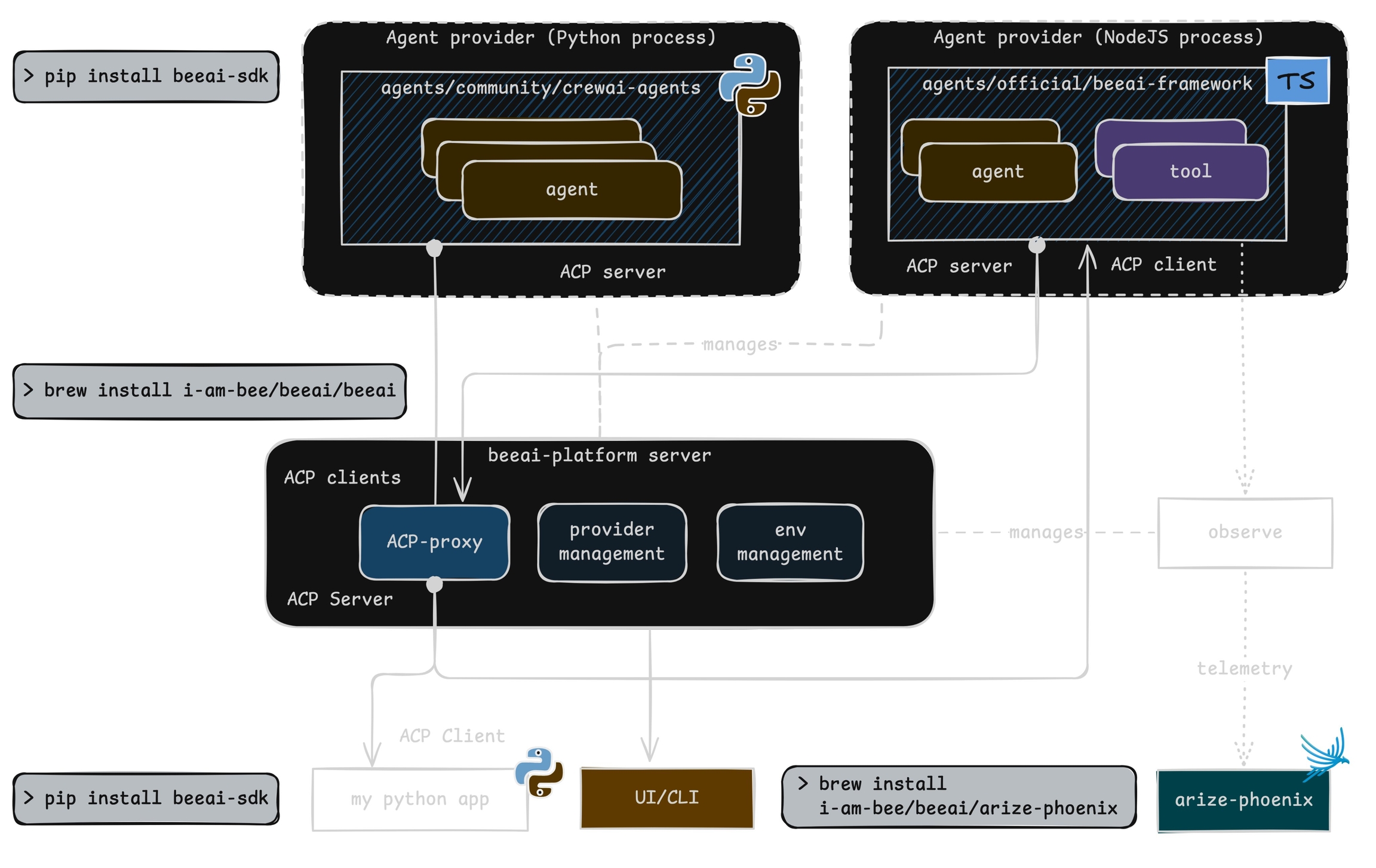
Observe Phoenix provides visibility into your BeeAI agent operations by automatically tracing all interactions.
Troubleshooting Add the following at the top of your instrumentation.js to see OpenTelemetry diagnostic logs in your console while debugging:
import { diag , DiagConsoleLogger , DiagLogLevel } from "@opentelemetry/api" ; // Enable OpenTelemetry diagnostic logging diag . setLogger ( new DiagConsoleLogger (), DiagLogLevel . INFO );
If traces aren’t appearing, a common cause is an outdated beeai-framework package. Check the diagnostic logs for version or initialization errors and update your package as needed.
Custom Tracer Provider You can specify a custom tracer provider for BeeAI instrumentation in multiple ways:
Method 1: Pass tracerProvider on instantiation const beeAIInstrumentation = new BeeAIInstrumentation ({ tracerProvider: customTracerProvider , }); beeAIInstrumentation . manuallyInstrument ( beeaiFramework );
Method 2: Set tracerProvider after instantiation const beeAIInstrumentation = new BeeAIInstrumentation (); beeAIInstrumentation . setTracerProvider ( customTracerProvider ); beeAIInstrumentation . manuallyInstrument ( beeaiFramework );
Method 3: Pass tracerProvider to registerInstrumentations const beeAIInstrumentation = new BeeAIInstrumentation (); beeAIInstrumentation . manuallyInstrument ( beeaiFramework ); registerInstrumentations ({ instrumentations : [ beeAIInstrumentation ], tracerProvider : customTracerProvider , });
Resources