Documentation Index
Fetch the complete documentation index at: https://arizeai-433a7140-mikeldking-12899-providers-and-secrets.mintlify.app/llms.txt
Use this file to discover all available pages before exploring further.
This tutorial shows how to classify code as readable or unreadable using benchmark datasets with ground-truth labels.
Key Takeaways:
- Download and prepare benchmark datasets for code readability evaluation
- Compare different LLM models (GPT-4, GPT-3.5, GPT-4 Turbo) for classification accuracy
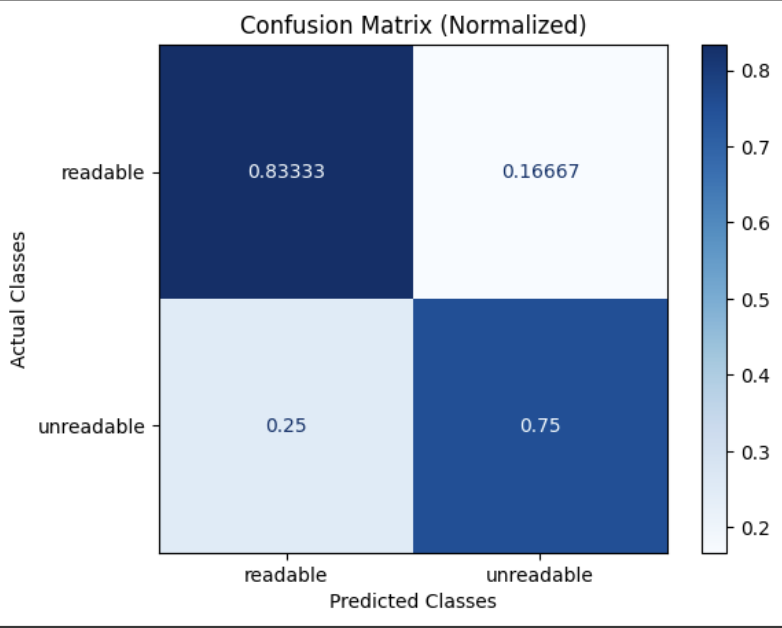
- Analyze results with confusion matrices and detailed reports
- Get explanations for LLM classifications to understand decision-making
Notebook Walkthrough
We will go through key code snippets on this page. To follow the full tutorial, check out the full notebook.
Google Colab
colab.research.google.com
Download Benchmark Dataset
dataset_name = "openai_humaneval_with_readability"
df = download_benchmark_dataset(task="code-readability-classification", dataset_name=dataset_name)
N_EVAL_SAMPLE_SIZE = 10
df = df.sample(n=N_EVAL_SAMPLE_SIZE).reset_index(drop=True)
df = df.rename(columns={"prompt": "input", "solution": "output"})
Run Code Readability Classification
Run readability classifications against a subset of the data.
from phoenix.evals import LLM, ClassificationEvaluator, async_evaluate_dataframe

CODE_READABILITY_PROMPT_TEMPLATE = """
You are evaluating whether a piece of code is readable or not.

[BEGIN DATA]
************
[Code]: {output}
************
[END DATA]

Is the code readable? Respond with "readable" or "unreadable".
"""

llm = LLM(provider="openai", model="gpt-4")
readability_evaluator = ClassificationEvaluator(
    name="code_readability",
    prompt_template=CODE_READABILITY_PROMPT_TEMPLATE,
    llm=llm,
    choices={"readable": 1.0, "unreadable": 0.0},
)

evals_df = await async_evaluate_dataframe(dataframe=df, evaluators=[readability_evaluator], concurrency=10)
readability_classifications = evals_df["code_readability_score"].str["label"].tolist()
Evaluate Results and Plot Confusion Matrix
Evaluate the predictions against human-labeled ground-truth readability labels.
true_labels = df["readable"].map({True: "readable", False: "unreadable"}).tolist()
choices = ["readable", "unreadable"]
print(classification_report(true_labels, readability_classifications, labels=choices))
confusion_matrix = ConfusionMatrix(
    actual_vector=true_labels, predict_vector=readability_classifications, classes=choices
)
confusion_matrix.plot(
    cmap=plt.colormaps["Blues"],
    number_label=True,
    normalized=True,
)
Get Explanations
When evaluating a dataset for readability, it can be useful to know why the LLM classified text as readable or not. The following code block runs the classifier with explanations included so that we can inspect why the LLM made the classification it did. There is a speed tradeoff since more tokens are being generated but it can be highly informative when troubleshooting.
readability_classifications_df = await async_evaluate_dataframe(
    dataframe=df.sample(n=5),
    evaluators=[readability_evaluator],
    concurrency=10,
)
readability_classifications_df["label"] = readability_classifications_df["code_readability_score"].str["label"]
readability_classifications_df["explanation"] = readability_classifications_df[
    "code_readability_score"
].str["explanation"]
Compare Models
Run the same evaluation with different models:
# GPT-3.5
llm_gpt35 = LLM(provider="openai", model="gpt-3.5-turbo")

# GPT-4 Turbo
llm_gpt4turbo = LLM(provider="openai", model="gpt-4-turbo-preview")